
Posted on March 3, 2026
- Product Description
- Product Highlights
- New Features
- Defects Fixed
- Documentation
- Contents of Release
- Platforms Supported
- Contact Information
Product Description
Cubit® is a full-featured software toolkit for robust generation of two- and three-dimensional finite element meshes (grids) and geometry preparation. Its main goal is to reduce the time to generate meshes, particularly large hex meshes of complicated, interlocking assemblies.
Product Highlights
Meshing: Cubit® is a solid-modeler based preprocessor that meshes volumes and surfaces for finite element analysis. Mesh generation algorithms include quadrilateral and triangular paving, 2D and 3D mapping, hex sweeping and multi-sweeping, tet meshing, and various special purpose primitives. Cubit® contains many algorithms for controlling and automating much of the meshing process, such as automatic scheme selection, interval matching, sweep grouping and sweep verification, and also includes state-of-the-art smoothing algorithms.
Geometry Preparation: One of Cubit®’s strengths is its ability to import and mesh geometry from a variety of CAD packages. Cubit® currently integrates the ACIS and Catia geometry kernels directly within its code base, allowing direct manipulation of the native CAD geometry format within Cubit®. This reduces the errors and anomalies so often associated with geometry translation. CGM (Common Geometry Module) also boasts a facet-based geometry kernel developed at Sandia that can be used for remeshing or editing old mesh files or models defined by triangle facets. In addition, Cubit® has developed a comprehensive virtual geometry capability that permits local composites and partitions to geometry without modifying the underlying native geometry representation. The user can choose to ignore, clean-up or add features to the model allowing greater flexibility to meshing algorithms to generate better quality elements.
Cubit® Environment: Cubit® has developed both a convenient command line interface with an extensive command language as well as a polished graphical user interface environment. The GUI is based upon the cross-platform standard Qt, which allows the same look and feel on all supported platforms. Also included is a graphical environment based upon the VTK graphics standard which has been optimized for display and manipulation of finite element data and geometry. Fast, interactive manipulation of the model is a tremendous advantage for models with thousands of parts or millions of elements.
For more information on Cubit®, including licensing arrangements and terms see the Cubit® website.
New Features in Cubit® 17.08
Index of New Features
- Anisotropic tetrahedral meshing
- Improved ability to create cohesive surface elements
- Improved robustness sweeping with redistribute nodes
- Reduction in memory and increase in performance in sculpt refinement
- Sequences of uniformly refined meshes of tetrahedra or triangles up to billions of elements
- Improved robustness and performance of composite surfaces
- Names containing “:” are now accepted for geometry
- Protrusion detection and removal
- Shrink visualization of higher order elements
- Visualization of sideset pairs in contact
- Improved support for degenerate elements during import and export
- Faster opening of Cubit files with assemblies
- Ability to import sidesets from I-DEAS UNV files
- Improved support for code blocks and multi-line statements for Python scripting
- Enhanced naming support for boundary conditions
Meshing
Anisotropic tetrahedral meshing
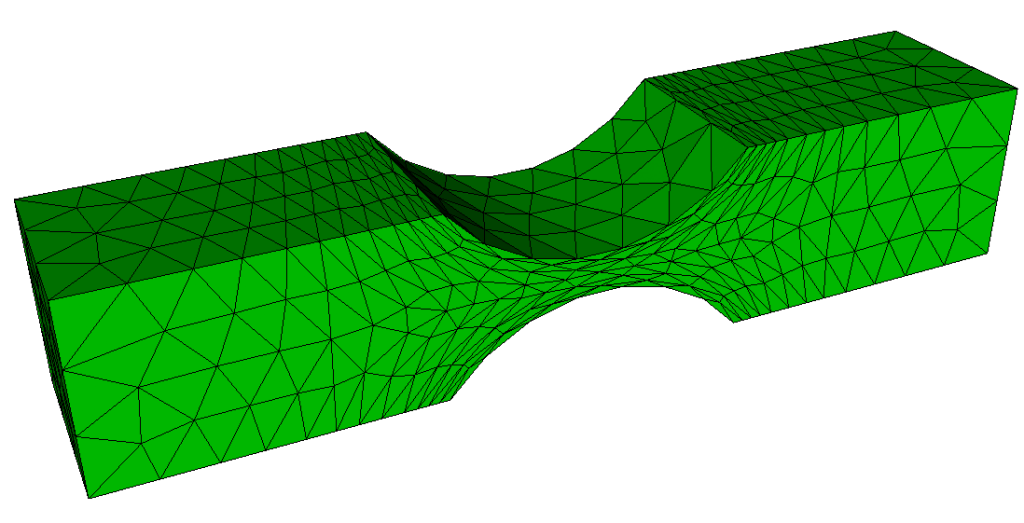
Cubit® now offers anisotropic tet meshing using a geometry based tensor field or a background sizing mesh. The geometry based tensor field can be specified using a new command:
Volume Sizing Function Source Surface Near [theta ] Growth_factorThe following image gives an example of a tet mesh that can be achieved with this new capability.
For more information see: Trimesh
Improved ability to create cohesive surface elements
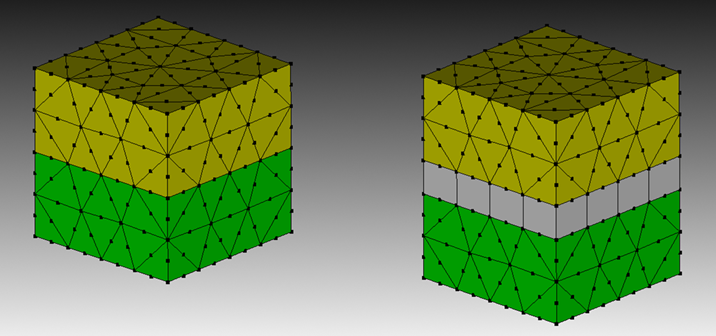
CSE support has been improved to support inserting CSEs in free mesh. Additionally CSEs can now be inserted into TETRA10 meshes, which will result in the creation of WEDGE12 elements. WEDGE12 is a new element type supported by Cubit®.
For more information see: Creating Cohesive Elements
Improved robustness sweeping with redistribute nodes
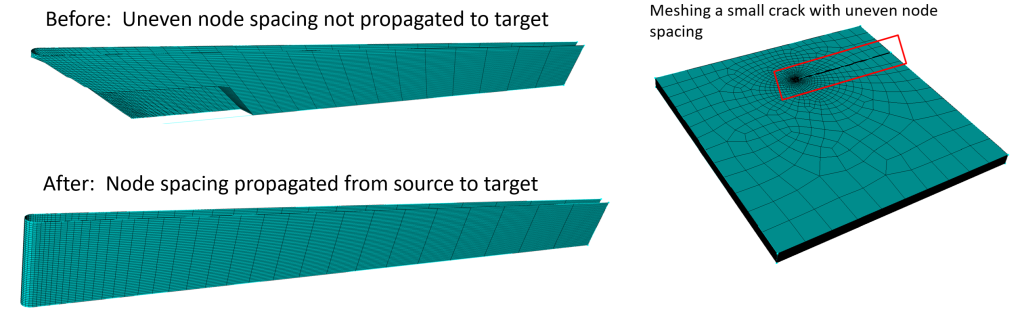
Sweeping with redistribute nodes reduces skew from source to target, preserving an uneven node spacing. Improvements have been made to handle more difficult cases.
For more information see: Sweeping
Reduction in memory and increase in performance in sculpt refinement
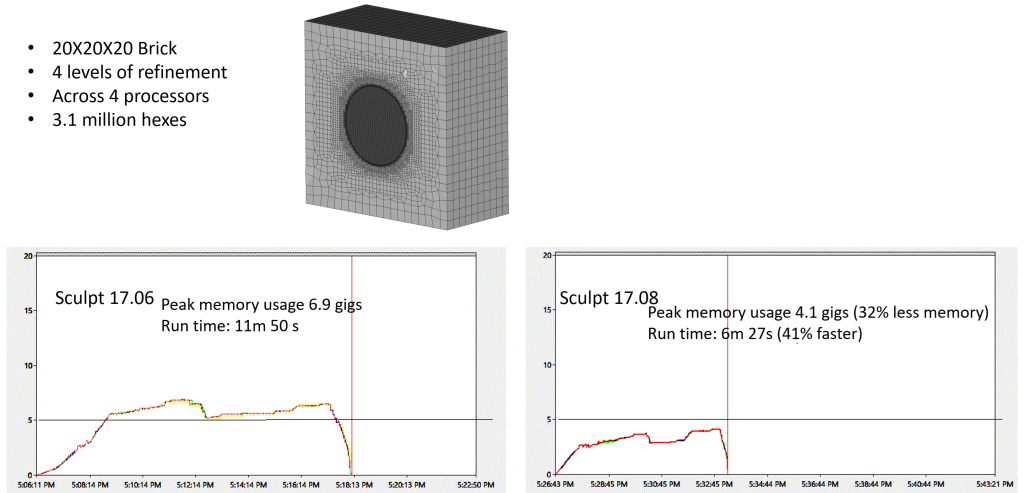
Sculpt shares two ghost layers of elements with adjacent processors to ensure identical behavior at processor boundaries. During refinement, these two layers can grow to many more, which are unnecessary. Sculpt now continually limits the refinement to two layers, significantly decreasing its memory footprint. Performance also increases because less elements are refined.
For more information see: Sculpt
Sequences of uniformly refined meshes of tetrahedra or triangles up to billions of elements
The ‘extra’ executable now offers the ability to create multiple meshes at once, each additional mesh a successive uniform refinement of the previous. Snapping to CAD geometry (STEP file) on each mesh is supported as before. New support was added for triangle and triangle shell element types. Support for larger meshes has been extended allowing the creation of huge mesh sizes–surpassing 4 billion elements–while significant improvements in multithreaded speed and memory usage limit runtimes to minutes or less depending on the platform, from laptops to large clusters.
For more information see: UMR
Geometry
Improved robustness and performance of composite surfaces
Opening files containing composite geometry is now more efficient and may be more noticeable on
composite surfaces made from a large number of surfaces. Additionally, geometric evaluations on
composite surfaces are more robust with a reduction in the number of defects or anomalies in the resulting mesh.
For more information see: Composite Surfaces
Graphical User Interface
Enabled shrink visualization of higher order elements
Visualization of higher order elements combined with the shrink option is now supported. For example, if the graphics shrink 0.1 command is used with higher order tetra elements, you’ll now get the following image.
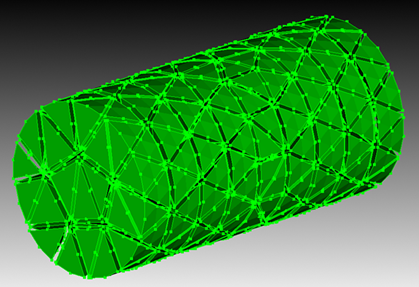
graphics shrink 0.1 appliedFor more information see: Shrink
New visualization of sideset contact pairs
Added a new Draw in Context action in the sideset tree view for sideset contact pairs. It zooms to the selected sideset, shows nearby or contacting sidesets within a small tolerance, and overlays attached volumes in wireframe. This helps analysts quickly validate contact intent, catch missing or incorrect pairings early, and reduce time spent debugging contact behavior in downstream analyses.
For more information see: Model Tree
Input/Output
Improved support for degenerate elements during import and export
When exporting degenerate elements, such as exporting tets as degenerate hexes, sidesets are now supported. Additionally, the degenerate hex convention for wedges is adjusted to follow Sierra conventions. Importing of these degenerate meshes back into Cubit has been improved to better handle various cases.
For more information see: Mixed Element Output
Faster opening of Cubit files with assemblies
When opening Cubit files containing large assemblies, Cubit will now import the file much quicker.
New ability to import sidesets from I-DEAS UNV files
When importing I-DEAS UNV files, Cubit will now read sidesets.
Miscellaneous
Improved support for code blocks and multi-line statements for Python scripting
Handling of code blocks has been improved by using an underlying Python capability to detect blocks of code. Multi-line definition of lists or dictionaries is now possible. User scripts not adhering to Python whitespace guidelines may see problems while Cubit processes the script. Visual indication is now given to the user when interactively typing multi-line blocks of python code. A “…” prompt will be shown if more input is expected to complete the block.
For more information see: Cubit® Python API
Enhanced Naming Support for Boundary Conditions
After naming a block/nodeset/sideset you can reference it by name like so: draw block with name “jack”
For more information see: Assigning Names to Nodesets and Sidsets
User Requests and Bug Fixes in Cubit® 17.08
- MESH-9261 Broken links in step-by-step tutorials in Cubit users manual are broken
- MESH-9164 Numsplit documentation is incorrect
- MESH-9255 Expect error command undocumented
- MESH-8989 STEP import failure
- MESH-9260 Cubit GUI slowness in 17.06
- MESH-9272 Issues running Sculpt from Cubit
- MESH-9224 Sculpt in Cubit didn’t work until module purge
- MESH-9259 Trouble with Cubit Graphics
- MESH-9222 Modifying Python Functions in Ongoing Cubit Session
- MESH-7927 Reset to clear python variables
- MESH-8817 Bolts not reducing correctly
- MESH-8322 ‘with name’ doesn’t work with sidesets
- MESH-5437 Pre-selection and selection of vertex is hard to see
- MESH-5412 Preview not recognized with propagate curve bias
- MESH-5409 Skeleton sizing on Virtual Geometry
- MESH-5288 Polygon picking pans instead of picks with custom mouse left-button settings
- MESH-5136 Composite after imprint/merge, followed by copy rotate gives bad mesh
- MESH-4967 Multiple processes from Python internal to Cubit
- MESH-4966 Cubit SDK API help
- MESH-4961 Colon in surf name shows false error in ITEM when decomposing volume
- MESH-4753 Support files in hdf5 format
- MESH-4752 Sticky incorrect corner types after geometric Booleans
- MESH-4750 mesh_adapt exports wrong mesh
- MESH-4692 Centroid incorrect for sheet bodies
- MESH-4534 Change remesh tet command
- MESH-4532 Client server needs working directory
- MESH-4371 Support MeshExportInterface in Python
- MESH-4357 Fix Multisweep so cubit_test/ccsweep/decomp_3a.jou is robust
- MESH-4356 Fix paver so cubit_test/pave_tests/high_angles.jou is robust
- MESH-4355 Trimesher ignores matched intervals
- MESH-4354 Desired behavior for infeasible intervals
- MESH-4353 Surface mesh having a different number of intervals than the same surface on a full volume mesh command
- MESH-4352 Vertex types not showing up during the draw command
- MESH-4309 Surface selection issue
- MESH-4189 Multiple volumes created after importing sculpt tetmesh as mbg
- MESH-4152 Running Cubit® without graphics libraries
- MESH-4102 Bounding Box highlighting doesn’t change when it should
- MESH-4078 Limit attribute values fields to the set attribute count
- MESH-3891 Tet remesh not working
- MESH-3792 Mesh Size not Used with Wedge Boundary Layer
- MESH-3790 Creating a named block in one command
- MESH-3789 Webcut fails
- MESH-3785 Create single mesh based geometry from multiple blocks
- MESH-3753 issue with periodic_check
- MESH-3751 Assigning element attributes on a per element basis
- MESH-9091 Sweeping issue with import sizing function
- MESH-9123 Composite sweep – Add more helpful error message
- MESH-9080 Cubit does not parse python correctly
- MESH-7099 Submap scheme doesn’t work on composited surfaces following a blunt tangent procedure
- MESH-9188 Fix ITEM dark mode coloring
- MESH-9168 Fix icons after repo reorganization
- MESH-8879 Joint node spider surface does not spider mid-side nodes
- MESH-6868 Split overconstrained does not work with composite surfaces
- MESH-9151 Exporting Ideas UNV mesh doesn’t save sidesets
- MESH-8204 Spider to default to bar element
- MESH-7311 Diagnose Geometry tab doesn’t consider sheet bodies
- MESH-7307 Webcut with general plane case not working
- MESH-7272 Unexpected behavior with rebar command
- MESH-7130 Right-click ‘select chamfer chains’ taking too long
Documentation Updates
The Cubit® 17.08 online documentation may be found here. A PDF version is also available for download. The Cubit® GUI installation also includes the full user documentation included with the program. The user’s manual may be accessed from the Help menu.
Cubit® 17.08 Contents of Release
Cubit® Program: The installation package includes executables and libraries, packaged in tar.gz files for Linux machines and a self-installing executable for Windows. Both a command line and GUI version of Cubit® are included with the installation package for all platforms.
Documentation: Both Linux and Windows versions of Cubit® include full online documentation.
Platforms Supported
Cubit® 17.08 supports the following Platforms:
- Linux RedHat Enterprise 8
- Windows 11
Non-Sandia Users
Cubit® is freely available for United States government use. For more information on licensing Cubit®, including academic, commercial, and all other use, go to our licensing page.
Sandia Personnel Only
Cubit® 17.08 may be downloaded from the Cubit® download page.
Windows
Download a Windows installation file and double-click to install.
Linux Desktop
Decompress and extract the .tar.gz archive, then run the ‘cubit’ script in the Cubit-17.08 directory
Linux LANs
Check with your local LAN administrator for instructions on how to access Cubit® on your local LAN. In most cases typing one of the following commands at the UNIX prompt should allow you to run Cubit®. In some cases, the full path will need to be specified: /projects/cubit/<cubit_command>
| cubit | The latest released version (17.08) of Cubit® deployed to the LAN. |
| cubit -nogui | The latest released version (17.08) with just the Command Line and graphics window |
| cubit -nogui -nographics | The latest released version (17.08) with just the Command Line |
| cubit-17.08 | Version 17.08 with GUI |
| cubit-beta | The latest beta version still in development |
Contact Information
Cubit® Help
For general technical questions including download, installation and Cubit® technical assistance.
Cubit® Licensing and Passwords
Email: asc-approvals@sandia.gov
Cubit® Support Lead
Trevor Hensley
Phone: 505-844-3304
Email: cubit-help@sandia.gov
Cubit® Project Lead
Ryan Viertel
Email: rvierte@sandia.gov