
The CompSim-Geometry and Meshing Team is pleased to announce Version 17.10 of the Cubit® Geometry and Mesh Generation Toolkit. The following is a sampling of new capabilities and improvements introduced in Cubit® 17.10. See the Cubit® 17.10 Release Notes for a complete list, which includes many resolved user tickets and new capabilities developed in support of the Accelerated Model Development (AMD) initiative.
What’s New…
Meshing
- Improved robustness for triangle meshing
- Hardened tri and tet collapse operations
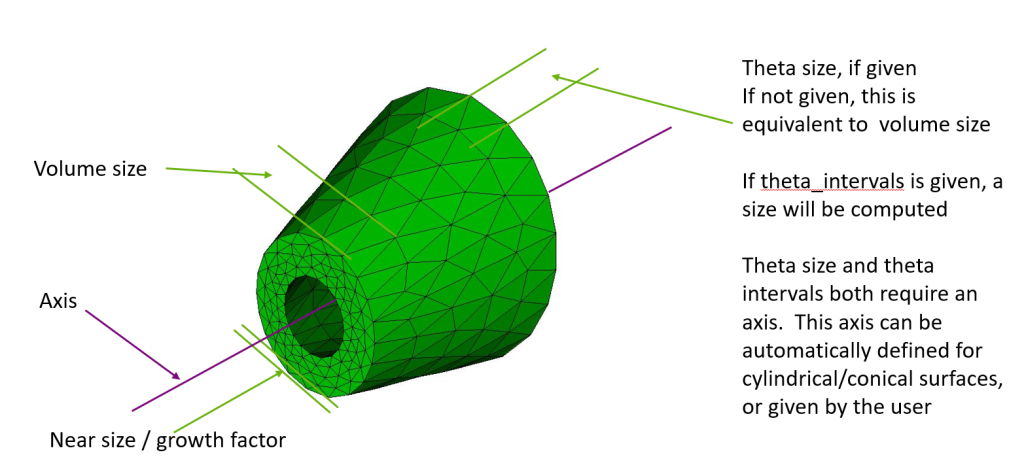
- Enhanced geometry based anisotropic sizing specification
Geometry
- Performance and robustness improvements for facet based geometry
- Enhancements to for sliver surface/curve removal
- New Boolean subtract option to keep the subtracted body
- New webcut offset operation
- Python API support for protrusion queries
- Remove surface command supports protrusion removal
Graphical User Interface
- Journal editor font consistency
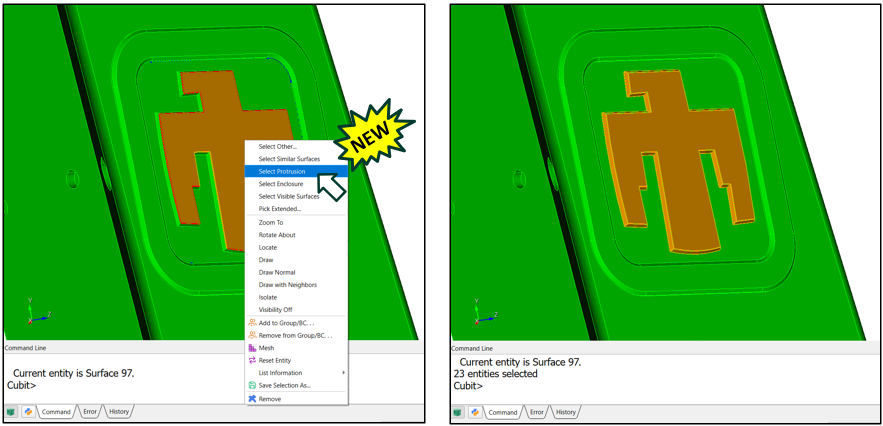
- Protrusion selection and diagnostics
Input/Output
- Improved support for degenerate elements during import and export
- Faster opening of Cubit® files with assemblies
- Ability to import sidesets from I-DEAS UNV files
Miscellaneous
- Python API support for sideset contact pairs
- Python scripts with message handlers
How to Get it…
Cubit® is available to anyone on the Sandia LANs. Cubit® 17.10 will now run automatically from the Linux command prompt, replacing Cubit® 17.08. It is also licensed free of charge for government use outside of Sandia. If you are a current Cubit® licensed user, you may get Cubit® 17.10 by visiting and following the instructions on the Cubit® Download page. See Cubit® Licensing for information on obtaining a license.
How You Can Learn More…
The Cubit® 17.10 Release Notes provide a description of all the new features included in Cubit® 17.10. For detailed information follow the links to the online users manual.
Classroom tutorials are advertised on the Cubit® Tutorial Webpage, where you can also find a download for self-guided tutorials.
For more information contact, Cubit® Product Owner Ryan Viertel.