
- Product Description
- Product Highlights
- New Features
- Defects Fixed
- Documentation
- Contents of Release
- Platforms Supported
- Contact Information
Product Description
Cubit® is a full-featured software toolkit for robust generation of two- and three-dimensional finite element meshes (grids) and geometry preparation. Its main goal is to reduce the time to generate meshes, particularly large hex meshes of complicated, interlocking assemblies.
Product Highlights
Meshing: Cubit® is a solid-modeler based preprocessor that meshes volumes and surfaces for finite element analysis. Mesh generation algorithms include quadrilateral and triangular paving, 2D and 3D mapping, hex sweeping and multi-sweeping, tet meshing, and various special purpose primitives. Cubit® contains many algorithms for controlling and automating much of the meshing process, such as automatic scheme selection, interval matching, sweep grouping and sweep verification, and also includes state-of-the-art smoothing algorithms.
Geometry Preparation: One of Cubit®’s strengths is its ability to import and mesh geometry from a variety of CAD packages. Cubit® currently integrates the ACIS and Catia geometry kernels directly within its code base, allowing direct manipulation of the native CAD geometry format within Cubit®. This reduces the errors and anomalies so often associated with geometry translation. CGM (Common Geometry Module) also boasts a facet-based geometry kernel developed at Sandia that can be used for remeshing or editing old mesh files or models defined by triangle facets. In addition, Cubit® has developed a comprehensive virtual geometry capability that permits local composites and partitions to geometry without modifying the underlying native geometry representation. The user can choose to ignore, clean-up or add features to the model allowing greater flexibility to meshing algorithms to generate better quality elements.
Cubit® Environment: Cubit® has developed both a convenient command line interface with an extensive command language as well as a polished graphical user interface environment. The GUI is based upon the cross-platform standard Qt, which allows the same look and feel on all supported platforms. Also included is a graphical environment based upon the VTK graphics standard which has been optimized for display and manipulation of finite element data and geometry. Fast, interactive manipulation of the model is a tremendous advantage for models with thousands of parts or millions of elements.
For more information on Cubit®, including licensing arrangements and terms see the Cubit® website.
New Features in Cubit® 17.10
Index of New Features
- Enhanced geometry based anisotropic sizing specification
- Improved robustness for triangle meshing
- Hardened tri and tet collapse operations
- Performance and robustness improvements for facet based geometry
- Enhancements to for sliver surface/curve removal
- New Webcut Offset Operation
- New Boolean Subtract Option
- Remove Surface command supports protrusion removal
- Journal editor font consistency
- Protrusion selection and diagnostics
- Python API support for sideset contact pairs
- Python scripts with message handlers
Meshing
Enhanced geometry based anisotropic sizing specification
New options are now available for anisotropic sizing on conical type geometries. A new theta_interval option can be used to define intervals as an alternative to using theta to define a size. Additionally, one can specify a theta_axis option if an axis cannot be directly computed from the input geometry. Geometry feature sizing can now be combined with anisotropic sizing to produce finer elements in areas of high curvature.
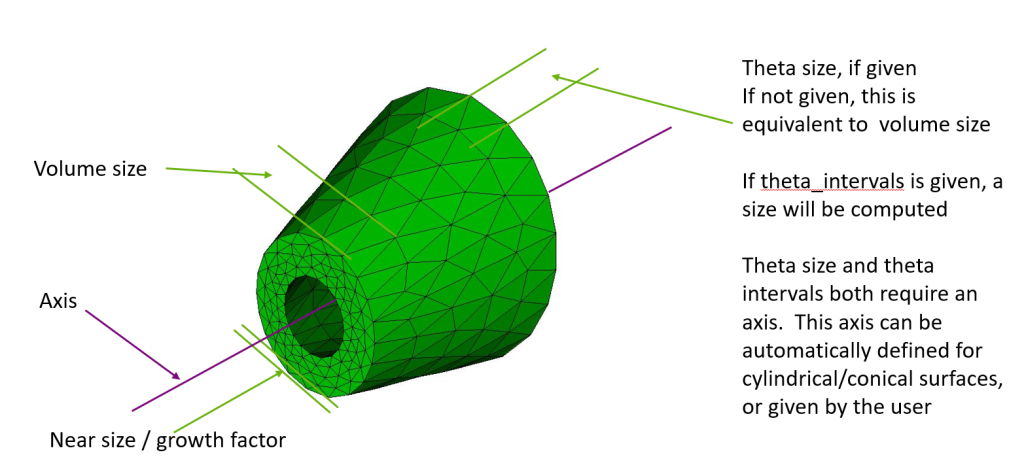
For more information see: Anisotropic Sizing Function
Improved robustness for triangle meshing
Triangle meshing robustness has been improved with an updated version of MeshGems. Additionally, triangle meshing of composite surface is improved by using underlying analytic representations for more use cases.
For more information see: Trimesh
Hardened tri and tet collapse operations
Several bugs were fixed in tri and tet collapses to increase element quality and to better handle higher order nodes.
For more information see: Collapsing Mesh Edges
Geometry
Performance and robustness improvements for facet based geometry
Performance of geometry evaluations on facet based geometry and composite geometry has been increased with more efficient calculations.
For more information see: Mesh Based Geometry
Enhancements to for sliver surface/curve removal
Users can better control sliver removal by excluding specified curves and surfaces from removal.
For more information see: Remove Sliver Surfaces
New Boolean subtract option
Boolean operations (subtract, unite, intersect) now have a ‘keep_tool’ option, preventing the tool volume/body from getting consumed.
For more information see: Subtract
New webcut offset operation
Webcut by offsetting a set of surfaces. This decomposition can be useful for creating boundary layers. In the images below, the half cylinder is webcut by offsetting three of its surfaces inward. The ‘loft’ option creates individual volumes for each offset surface.
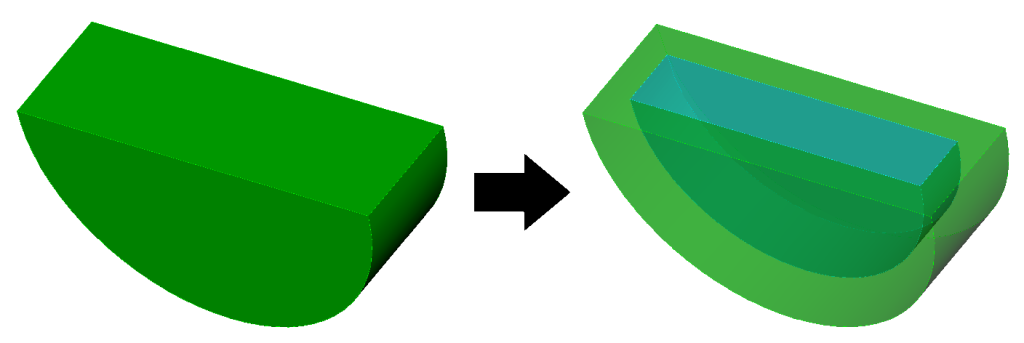
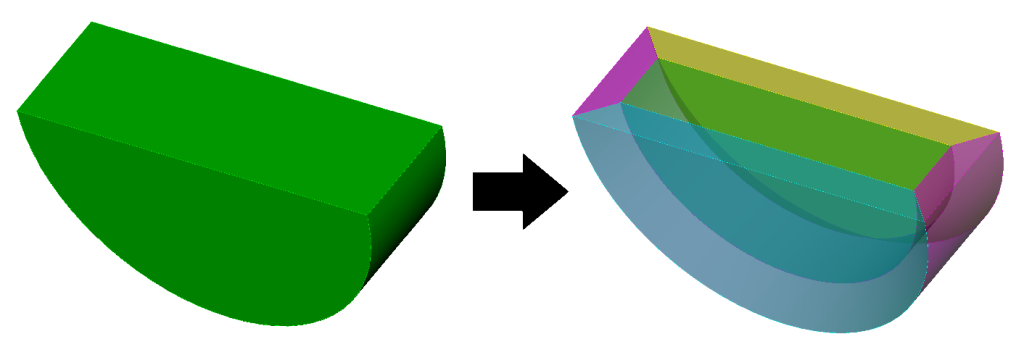
For more information see: Web Cutting
Remove Surface command supports protrusion removal
The remove surface command can now remove all surfaces belonging to a protrusion by selecting a surface on the protrusion.
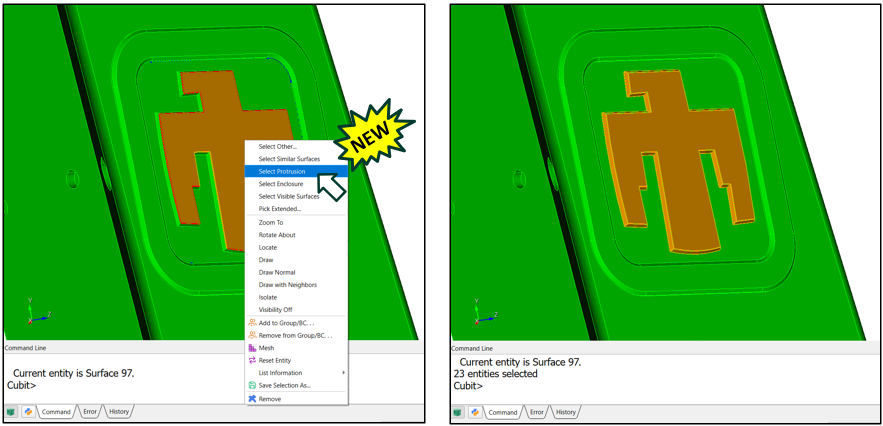
For more information see: Right Click Commands
Python API support for protrusion queries
New Python API functions are available to identify protrusion surface collections, test whether a surface belongs to a protrusion, return the surfaces in a protrusion, and generate protrusion removal solution commands.
For more information see: Cubit® Python API
Graphical User Interface
Journal editor font consistency
The journal editor now uses a consistent font for all documents in the journal editor.
For more information see: Journal Editor
Protrusion selection and diagnostics
The graphics window context menu now supports selecting protrusion surface sets. A protrusion diagnostic has also been added to the Geometry Power Tool.
For more information see: Geometry Power Tools
Miscellaneous
Python API support for sideset contact pairs
A new Python API function can identify sideset-based contact interfaces for specified volumes or blocks and return compact contact interaction records.
For more information see: Cubit® Python API
Python scripts with message handlers
Python scripts are now allowed to use message handlers to capture and process output, even while running under the GUI. Previously, this was allowed only for scripts running under a user-started python process.
For more information see: Cubit® Python API
User Requests and Bug Fixes in Cubit® 17.10
- FAST-9427 – Fix crash on reset
- FAST-9291 – Typo in tetmesh GUI
- FAST-9404 – Surf is not recognized
- FAST-9393 – Unable to exit python for loop
- FAST-9258 – Refining a 2D triangular mesh
- FAST-9446 – Cubit Segmentation Faults
- FAST-9440 – Tets unpickable after becoming tetra10s
- FAST-9438 – Cubit Regression with parsing elems
- FAST-9421 – Latest Cubit needs a new argument to run a python code
- FAST-9411 – Entity labels in GUI confusing
- FAST-9442 – Only half of align working
- FAST-9429 – Error with copy reflect x with undo off
- FAST-9997 – Select surf include chamfer
- FAST-10001 – Error when compositing something that is already selected
- FAST-9288 – Importing step and acis file will not save colors
- FAST-10039 – Segfault with spider joint
- FAST-10042 – Improve get_last_id
- FAST-10023 – Collapse tri ruins mesh
- FAST-10041 – Error in cubit python parse
- FAST-9026 – Output recorded to terminal
- FAST-9191 – Surfaces categorized falsely as cavity
- FAST-10063 – Volume boolean subtract keep_tool option
- FAST-9447 – Volume names disappearing in STEP and ACIS files
- FAST-10099 – Capturing error message form meshgems tetmesher when it fails
- FAST-10048 – Spider blocks incorrectly associated with mesh owners
- FAST-8819 – Collapse gone awry
- FAST-8818 – Collapsing tets makes everything worse
- FAST-9419 – MCNP port to Sandia Cubit
- FAST-9398 – Meshing for export dagmc
- FAST-10227 – Adding element type export commands from CUBIT –> Abaqus
- FAST-10097 – Remove sliver and remove slivers are brute force tools and should allow specifying a list of curves and surfaces respectively
- FAST-10096 – You cannot consistently use remove slivers (tiny surfaces) followed by remove sliver curve (tiny curves) on the same volume in the same cubit session.
- FAST-10229 – Morph to Straighten midnodes using Scaled Jacobian in addition to Normalized in-radius
- FAST-10098 – UMR results in negative volumes
- FAST-9394 – Methods to augment training set / ML models
- FAST-10270 – Bug in CGNS export
- FAST-10105 – Want to import stl or facets and get one surface
- FAST-10090 – Add reset scaling option to gui?
- FAST-8788 – Increase Fontsize of Command Line
- FAST-8786 – Add a feature to assign a light mode and dark mode toolbar icon
- FAST-7311 – Diagnose Geometry tab doesn’t consider sheet bodies
Documentation Updates
The Cubit® 17.10 online documentation may be found here. A PDF version is also available for download. The Cubit® GUI installation also includes the full user documentation included with the program. The user’s manual may be accessed from the Help menu.
Cubit® 17.10 Contents of Release
Cubit® Program: The installation package includes executables and libraries, packaged in tar.gz files for Linux machines and a self-installing executable for Windows. Both a command line and GUI version of Cubit® are included with the installation package for all platforms.
Documentation: Both Linux and Windows versions of Cubit® include full online documentation.
Platforms Supported
Cubit® 17.10 supports the following Platforms:
- Linux RedHat Enterprise 8 and 9
- Windows 11
Non-Sandia Users
Cubit® is freely available for United States government use. For more information on licensing Cubit®, including academic, commercial, and all other use, go to our licensing page.
Sandia Personnel Only
Cubit® 17.10 may be downloaded from the Cubit® download page.
Windows
Download a Windows installation file and double-click to install.
Linux Desktop
Decompress and extract the .tar.gz archive, then run the ‘cubit’ script in the Cubit-17.10 directory
Linux LANs
Check with your local LAN administrator for instructions on how to access Cubit® on your local LAN. In most cases typing one of the following commands at the UNIX prompt should allow you to run Cubit®. In some cases, the full path will need to be specified: /projects/cubit/<cubit_command>
| cubit | The latest released version (17.10) of Cubit® deployed to the LAN. |
| cubit -nogui | The latest released version (17.10) with just the Command Line and graphics window |
| cubit -nogui -nographics | The latest released version (17.10) with just the Command Line |
| cubit-17.10 | Version 17.10 with GUI |
| cubit-beta | The latest beta version still in development |
Contact Information
Cubit® Help
For general technical questions including download, installation and Cubit® technical assistance.
Cubit® Licensing and Passwords
Email: asc-approvals@sandia.gov
Cubit® Support Lead
Trevor Hensley
Phone: 505-844-3304
Email: cubit-help@sandia.gov
Cubit® Project Lead
Ryan Viertel
Email: rvierte@sandia.gov