Slot Surface Preparation with the
Geometry Power Tool
This page describes the slot surfaces diagnostic tool that is
part of Cubit's
Geometry Power Tool. The Slot Surfaces diagnostic is a new
addition to the geometry power tool for preparing slot surfaces
in Electromagnetic (EM) modeling. A slot surface is used to
identify potential pathways where EM radiation can potentially
exit. This diagnostic will help manage slot surfaces and prepare
them for the application of boundary conditions and analysis.
This diagnostic utilizes Machine Learning (ML) to predict the
most likely slot surfaces.
Background
The
Geometry Power Tool in Cubit provides a series of diagnostic
checks on your model used to defeature or simplify a CAD model
prior to meshing. Clicking the Analyze button will perform
the selected diagnostic tests and display an expanding tree
listing geometric entities that are identified by each test. Once
identified, suggested solutions can be easily previewed and
executed.
The Slot Surfaces diagnostics work best in conjunction with
the machine learning models.
As such, to use this diagnostic the Load ML Models button
must first be selected using the procedure described in the page
Machine Learning with the Geometry
Power Tool.
|
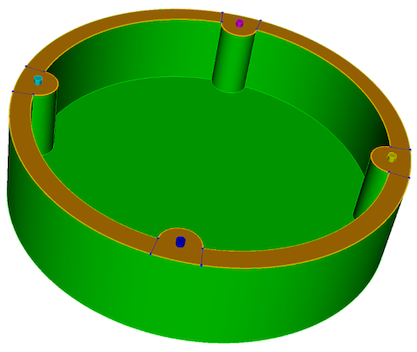
Figure 1.
Example volume showing slot surface highlighted.
|

Figure 2.
Slot Surfaces diagnostic displayed with Solution
window.
|
Slot
Surfaces
The Slot Surfaces diagnostic is only available when the ML
Models have been previously loaded in the Options panel. Once the
ML models are loaded, select the Slot Surfaces diagnostic from
the list of diagnostic tools. When this diagnostic is selected,
the analyze button will identify all surfaces that are identified
as slots. The surfaces will be separated into two groups: simple
and complex.
- Simple Slots: Simple slots have four sides and can
be used directly for representing slots without further
decomposition.
- Complex Slots: Complex slots can be comprised of
groups of adjacent surfaces or can be a single surface that may
require additional decomposition. For example, a gasket-type
surface between two volumes that may be held together with
bolts or another type of fastener. Each grouping of surfaces in
the complex category can be expanded and individual surfaces
selected. Selecting a surface will display potential reduce
operations in the solution window.
Solutions Window
If the
Show Solutions checkbox is
selected, a list of potential decomposition strategies will be
listed in the solutions window. The decomposition strategies will
be variations of the
reduce surface slot command. Selecting a solution will
preview where cuts will occur and double-clicking will execute
the cuts. If fasteners are present, the ML tools should identify
them and use them in the
reduce surface slot commands
presented in the solutions window.
Right-Click Menu Options
The slot surfaces diagnostics
provide many of the same visualization options available with the
other diagnostics. A few additional tools, useful for shell
modeling, are also provided and described here:
Export Slot Data
This option supports the setup of a
Morph input deck and will execute the command
export slot data. Morph is an external meshing tool
developed at Sandia. Morph supports slot surfaces for modeling
EM, but requires named surfaces and curves to identify the
correct topology. When selected, a file browser will appear where
a filename can be specified. A text file will then be written
with the necessary information needed for Morph input for slot
surfaces.
List Slot Data
Executes the command
export slot data preview. Similar to the
Export
Slot Data... menu option, rather than writing a text file,
the information will be echoed to the Cubit output window.
Reduce Slot Surface
Available when selecting a solution
in the solutions window. The command panel for reducing surface
slots will appear. This panel provides options to input the
hardware and radius information, automatically populating the
necessary fields based on the slot geometry. Additionally, users
have the ability to specify grouping and naming options for the
decomposed slot surfaces.
